
Safely and cheaply run an agent factory
September 17, 2026 · 8 min read
As using AI agents in software engineering projects began taking off, I was horrified to learn that a significant number of people were running AI agents on their personal computers with full-permission bypasses.
Sure, it's a natural evolution from when we manually approved commands, and I’m sure many people realized that nothing really bad happened from approving things blindly, so going to full permissions probably wasn’t a huge issue from their point of view.
However, this is my personal computer! This is a nightmare from a security and privacy point of view, not to mention the risk of accidentally nuking your system (which many people seem to have found out the hard way).
When I began this project back around February, it was the Wild West, with everyone trying to figure out how to work with the new paradigm, and I didn't find any solutions that were viable. Fast forward eight months: a lot of solutions have popped up in the industry, and I have an implementation that works well with my personal workflows.
Before AI-assisted coding became common, there were three main approaches people used for software development.
Everything runs on the computer you’re using, including the code and the IDE.
Pros
- Very easy to set up.
- Extremely well supported; this is probably how most people develop software.
- No network connectivity is required, assuming you’ve already downloaded everything you need.
Cons
- Potentially insecure: a malicious project, accidental command, or mistake could affect your main computer or delete personal files.
- A single development environment is shared across many projects, although there are tools to help with this.
- Heavy workloads such as long compilations can significantly affect battery life.
- Downloading large dependencies over a mobile hotspot or unreliable internet connection can be an issue.
- Requires additional resources (CPU, memory, storage) on your main machine, which can get costly, especially for laptops.
Most things run on a remote machine at home or in the cloud, typically running Linux. SSH through your terminal or use an IDE that supports SSH backend setup.
Pros
- Provides better isolation from your personal device, assuming the remote machine does not contain personal information or anything else you particularly care about.
- It’s easier and cheaper to add hardware to a desktop or server than to a laptop. 128 GB of RAM on a desktop is much cheaper than on a MacBook.
- You don’t have to worry nearly as much about battery life.
- Large dependency downloads are not an issue as the machine can be located somewhere with better internet.
Cons
- An agent can still nuke your machine, although the blast radius is limited.
- Network connectivity is required.
- Projects running on
localhostcan be difficult to access from your local machine. - GUI-related software and other things that need direct access to the local machine can be difficult to test.
- You still have the single-development-environment problem, where many projects share the same environment.
- Requires a second computer or cloud provider.
Spin up a development container and work inside it. This can be done either locally or remotely.
Pros
- Provides better isolation from your personal device, even when running locally.
- When running locally, it is easier to connect to projects running on
localhost, since they are on the same machine. - You can have different development environments for each project by using a different Dockerfile.
Cons
- More difficult to set up.
- Installing and configuring tools and dependencies regularly while working can be annoying.
- Depending on whether you run the containers locally or remotely, you still inherit many of the issues associated with those approaches.
- Testing Docker inside the environment is difficult unless you provide Docker-in-Docker, which requires a privileged container and may not be desirable from a security perspective.
- GUI-related software and other things that require direct access to the machine can still be difficult to test.
I was already familiar with container-based development on a remote machine, and I wanted to make this model compatible with the new paradigm.
I created a Docker container orchestrator that would let me easily create and SSH into Docker containers running on a remote Linux machine.
These containers had their dependencies installed as part of the build step and all the credentials injected. As soon as I landed in the shell, I could start an agent and it could work in the pre-downloaded repository, push changes to GitHub, and so on. Once I was done with it, I could quickly delete the container.
This worked great, and the environment isolation was immediately much better than with Git worktrees, which still carried the risk of agents nuking each other's environments, as well as other issues with shared environments like port overlap and file descriptor exhaustion. However, this solution was not perfect:
Because the environment was a Docker container, it was hard to test projects that themselves had to be containerized or used Docker, including the orchestrator project itself! Docker-in-Docker was possible, but it meant I would need to give the container more privileges than I was happy with, especially since a large component of the project was to provide isolation from an agent.
I was also unhappy with the environment setup. If I wanted to install a new tool into the sandbox, I would have to edit the Dockerfile and add a new installation step. That change would not propagate to existing containers.
I kept having the annoying experience of having to restart old containers or destroy and create new ones over and over again. This was especially annoying in the early stages, when I was still building out many of the tools for my workflows.
There was also no particularly elegant way to add different tools. I could have one massive Dockerfile, or build some sort of Dockerfile composition system, but I did not like either approach.
... what does that even mean? Let me explain:
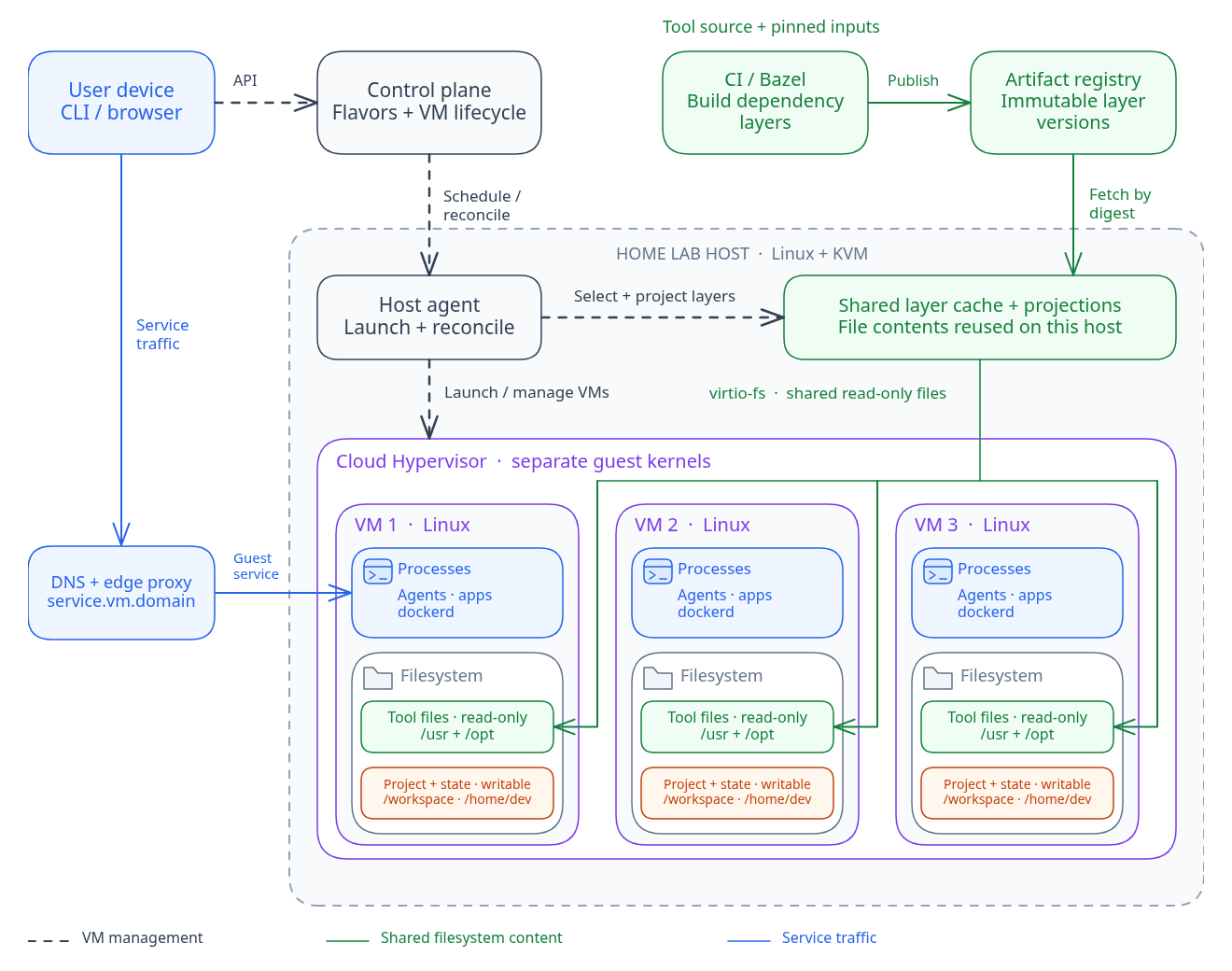
I wanted to use virtual machines rather than containers in order to provide agents with full access to a Linux environment. One of the things we got from this was the ability to run Docker inside the sandbox without exposing the host kernel, which makes many development workflows and validation much easier to do securely.
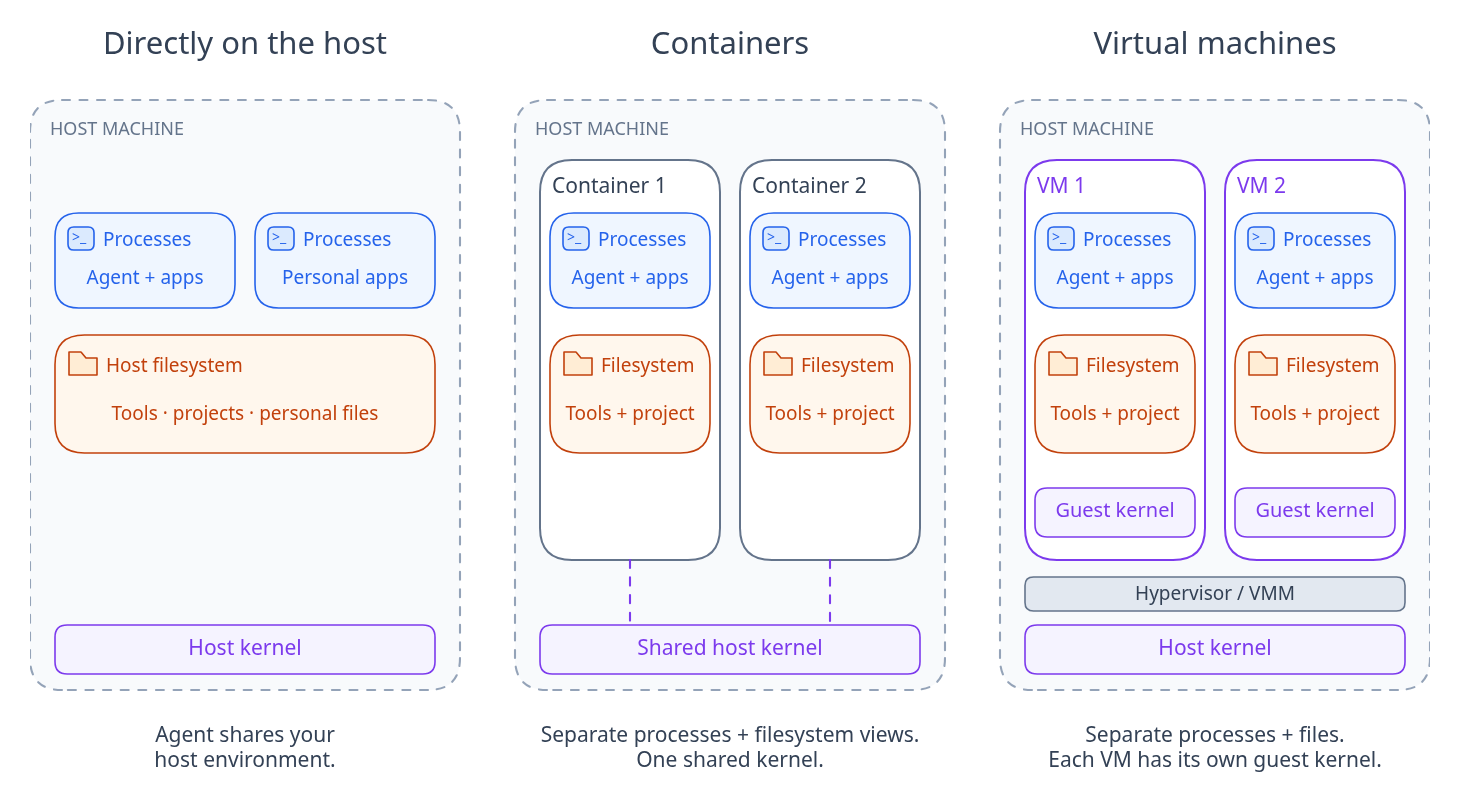
I used Cloud Hypervisor for the VMM. Firecracker is also a popular option, but it was missing a few features that I needed. Both allow you to create microVMs, which are essentially stripped-down, resource-efficient VMs, perfect for running dozens of them on constrained hardware.
I'm a huge fan of [X]aC frameworks like Terraform and NixOS, and I wanted to bring that into my development workflow. I'm pretty proud of the solution I came up with, and as of this writing, I haven't found anyone with this setup, so perhaps I am a pioneer here 😎.
We introduce the concept of flavors, which are imperative configs for how to set up a read-only directory. Each VM is assigned one flavor, and flavors can inherit other flavors. The final flavor DAG is pre-validated and built through my CI/CD pipeline to create a filesystem layer pool to be projected and mounted onto the VMs.
The read-only nature of the mounted flavor directory means that once we update a flavor (such as updating a tool), we can safely propagate the changes to all live environments without rebooting. Read-only also means we can share the same mount across multiple VMs and effectively pay the storage cost only once, which is important because some of my dependencies are massive! Other directories in the VM are read-write, so the state of programs from flavors can be saved there across updates.
Flavors are more than directory recipes, though; they also have configurable setup/teardown hooks, which are super useful if your flavor needs to run a daemon.
Of course, running processes won't receive the changes until the program restarts, but most tools I'm providing aren't long-running, and you can restart anything long-running, which beats restarting the VM.
This setup has been super valuable for me, especially in the earlier stages of development when I was creating and updating tools left and right.
Of course, localhost won't work, so we need a way to connect to each VM easily. I settled on exposing a CLI that would allow a sandbox with an ID of sb123 to map internal VM networks to an internal URL ([*optional].sb123.myinternalsite.com). I was already running my own DNS server and load balancer proxy, so this wasn't too much work to set up.
GNOME with CUA integration, custom T3 Code fork to create a VM per thread, agent history backup, CPU sharing, memory ballooning and reallocation, etc. I might revisit some of these topics in a future blog post.
Now I can do development in a way where I rarely encounter issues that remind me that I'm working from a remote machine. For years I struggled with the poor remote backend support in IDEs, and I'm glad agents came to fix that. Now I'm in the process of removing most developer tools from my Mac and doing all my away-from-home development through my phone (and soon glasses 👀).
Working with ephemeral environments also changes how you work for the better. You can be very explicit about what you want to save, such as intentional environment changes, while automatically throwing away everything else, such as one-time tools, debugging config changes, and temporary files. I see people setting up automatic cleanup solutions for the mess that agents + Git worktrees have introduced to their computers, hunting down random processes their agent started and never killed, or dealing with churn because one of the threads made an incompatible development environment change.
It seems that providing agents with remote, isolated environments is the direction the industry is headed in, and I'm excited to see what innovations we'll see in this area.
Do you have a better workflow? Do you have any questions? Please leave comments below!